
Every quote, order,
and shipment in one row.
From the second you submit an RFQ through delivery — status, price, qty, payment, files, and the message thread with our engineering team all on one screen. No more digging through inbox folders to find your last quote.
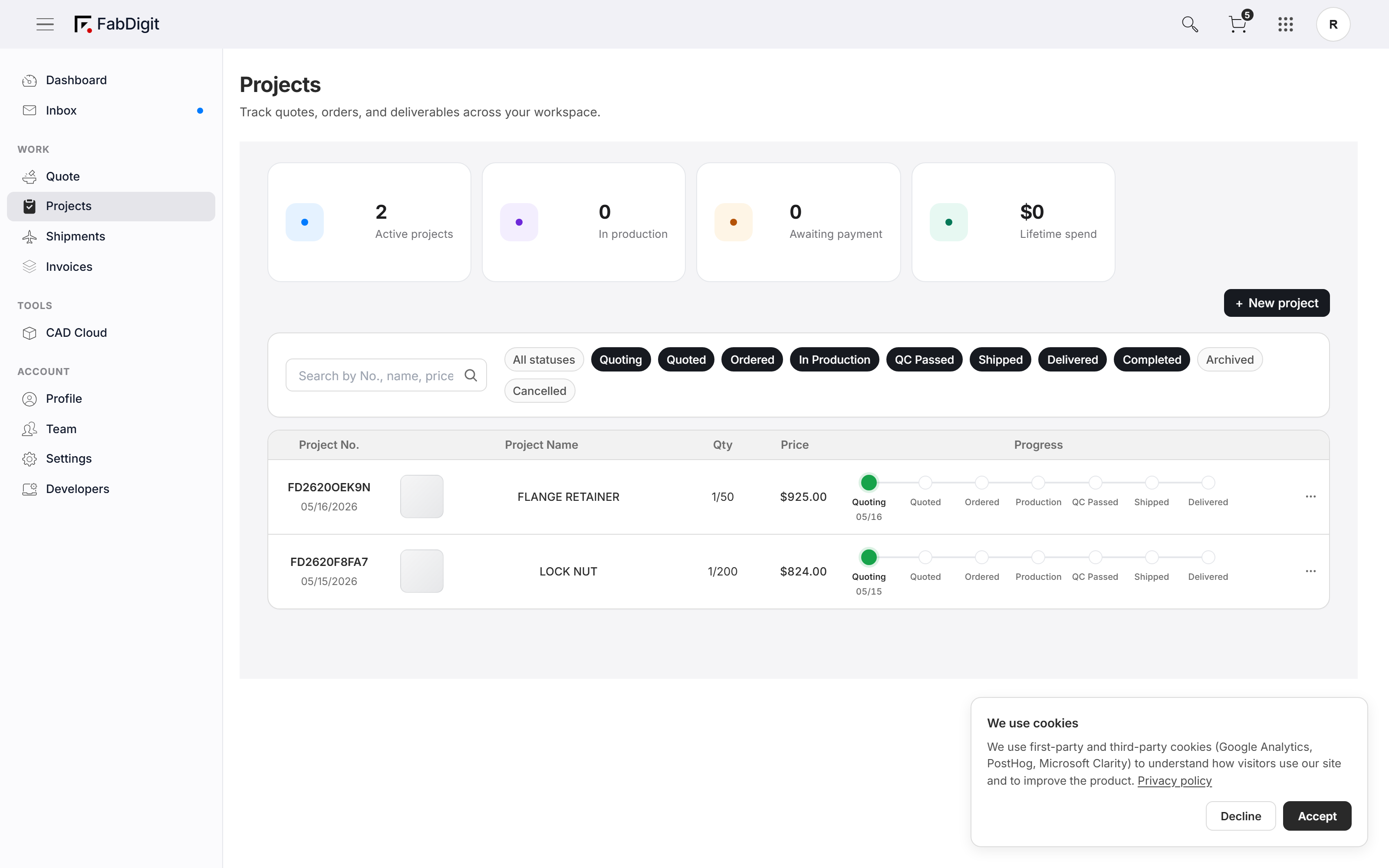
Seven lights. One row. Always current.
Quoting → Quoted → Ordered → In Production → QC Passed → Shipped → Delivered. Each project carries its own seven-light row that lights up in real time as production progresses. No emails to ask “where is it” — open the Hub, look at the row.
Per-row 7-step progress lights (Quoting → Delivered) with current step highlighted.
The four numbers that matter, always on top.
Active projects. Items in production. Awaiting payment. Lifetime spend. The Hub header keeps the four most-asked questions in front of you so you can answer them in one glance — without ever loading a separate analytics tab.
KPI cards above the table — Active, In Production, Awaiting Payment, Lifetime Spend.
Find any project. Three keystrokes.
Filter chips collapse the table to a single status (Quoted, In Production, Shipped, …). Free-text search by project number, part name, material, or price. The two combine so "Quoted aluminum parts over $5k" is two clicks and a word.
Filter chip row above the table — Active / Quoted / Production / Shipped / All.
Quote arrived. Pay without leaving the row.
When a quote lands the row’s Pay button lights up. Click it — Stripe checkout opens in-place, the row updates to Paid as soon as authorization succeeds. The whole "approve → pay → start production" arc happens without a single new browser tab.
Inline Pay modal — line items, totals, card field, all without leaving the Hub.
Files, messages, and shipping — all under one tab.
Click into a project: the detail view stacks every file revision, every message in the thread with the engineering team, packing photos, tracking number, and material certs in one tab tree. No "where was that DXF" — it’s under the project that uses it.
Per-project detail — Files / Messages / Shipping / Certs tabs.
Run every job from one screen.
Sign in to see your own projects roll up into the Hub.